Chat Rooms: Put a Sounding Board in Every Chat
Published:
The Problem With One Answer
Ask any chatbot a big question and you get one answer, from one point of view, every time. That answer is usually decent. It is also never the whole picture.
Real decisions deserve better. When you weigh a job offer, plan a trip, or argue with yourself about a side project, you want the optimist and the skeptic in the same room. You want someone to check your facts and someone to poke your plan. One model cannot be all of those things at once, because it has to pick a voice.
Now you do not have to pick one either.
What You Can Do Today
Open any chat on Chat-O, click Room, and pick the characters you want present. Five come built in:
- The Skeptic questions everything and finds the hole in your plan
- The Builder turns your idea into concrete steps
- The Optimist tells you what could go right, and takes your ambition seriously
- The Proofreader tightens your writing and catches sloppy thinking
- The Researcher goes and checks what is actually true
Then just talk. The room works like a small team, not a queue of chatbots:
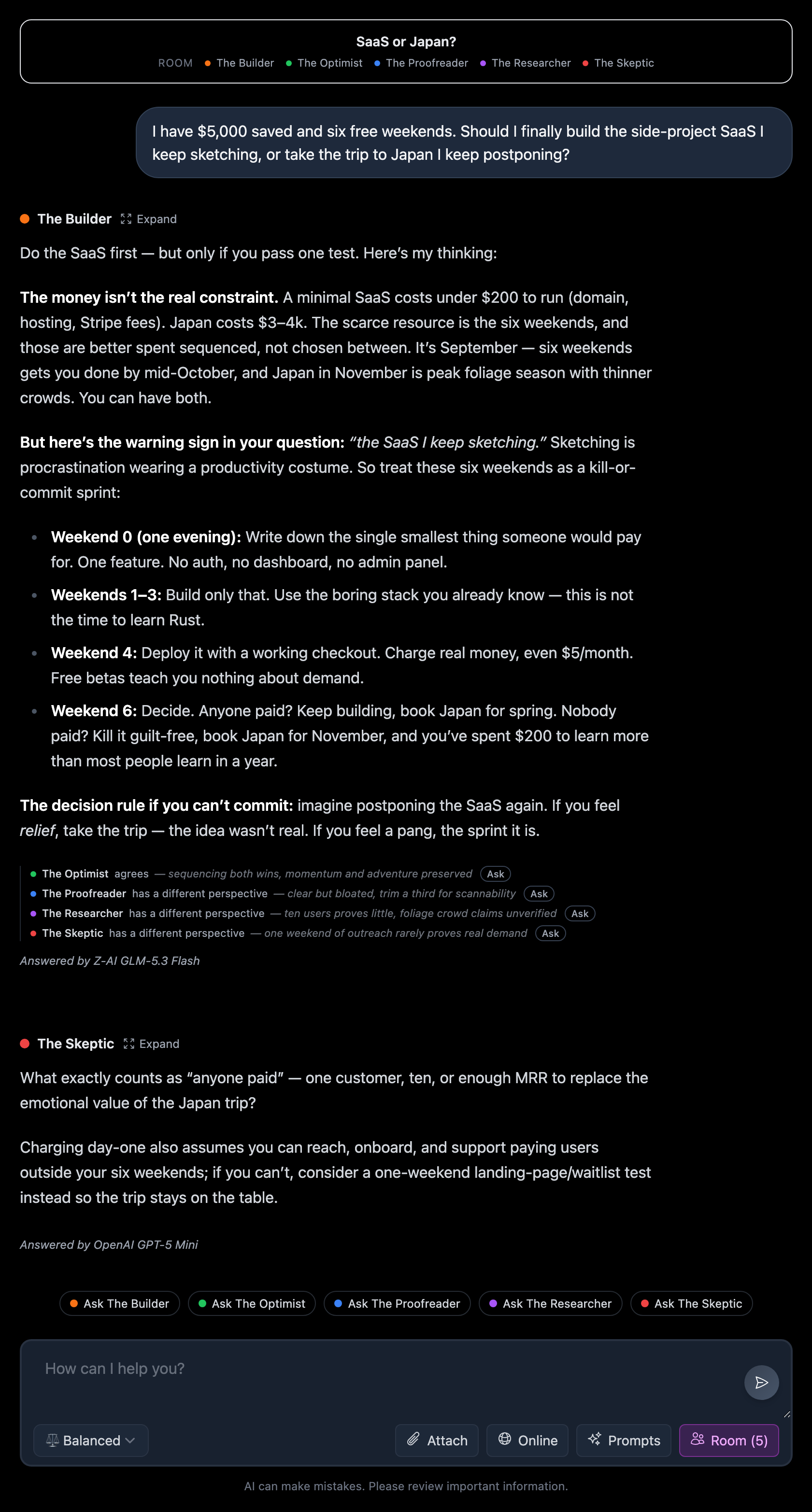
- Someone answers first, on purpose. A quick routing call reads your message and picks the character best suited to it. Ask for a review and The Skeptic steps up. Ask what could go right and The Optimist takes it.
- The rest react in one line each. Under the answer you see who agrees, who does not, and why, in eight words or fewer. Every line has an Ask button. One click and that character joins the conversation.
- Brief by default, deep on demand. Follow-ups stay short so the room adds signal instead of essays. Want more from anyone? Hit Expand.
- More perspective, without the pile-on. In a small early test, people kept telling us the same thing: it is genuinely fun—and unexpectedly helpful—to hear different characters chime in.
Build Your Own Agents
The built-in five are a starting point. The real power is making your own. In the Room panel, click to create a new character and give it three things: a name, a color, and instructions that define how it thinks. Pick a model for it, any model on Chat-O.
Instructions are a job description, not a biography. Write what this character cares about, what stance it takes, and what it always checks. A few lines is enough:
- The Money Person. “You are a thrifty CFO. Question every cost. Ask what the cheapest version of this plan looks like, and what happens to the money if we skip it.”
- The First-Time Customer. “You know nothing about our product and you are slightly impatient. Read this landing page and say exactly where you get confused or bored.”
- The Grumpy Tech Lead. “You have been burned by clever code. Prefer the boring solution. Reject anything that adds moving parts without a proven need.”
- The Regret Tester. “Fast forward five years. Which choice from this conversation would I regret, and why?”
Notice what these have in common: a clear stance, a job to do, and a way of talking. That is all a persona needs. You can also mix your own characters with the built-in ones, so The Grumpy Tech Lead and The Skeptic can gang up on your architecture in one turn.
When to Use a Room
Some moments where a room beats a single answer:
- Big decisions. The classic. State the question, let the room pull it apart. The screenshot above is real: $5,000, six free weekends, side-project SaaS or Japan trip. The Builder sequenced both, the Skeptic demanded a pay test, and the plan got sharper in one turn.
- Writing that has to work on someone else. Draft the email, the landing page, the pitch. Then let a skeptical character and a confused first-time reader react to it. Their one-line reactions tell you more than another edit from the same voice that wrote it.
- Learning something new. Ask for an explanation, then Ask the Researcher to verify the claim and The Skeptic to name the exceptions. You remember disagreements better than summaries.
- Sanity checks before you commit. Booking a flight, quitting a tool, raising your prices. Say the plan out loud and let the room disagree with you first, so reality does not have to.
The pattern is always the same: you bring the decision, the room brings the perspectives you would otherwise round up from five friends, three articles, and a late night of doubt.
Try It Free
Every new Chat-O account starts with 1,000 free credits, good for a week. That is plenty to try a stack of Chat Room conversations and find the mix of perspectives that helps you think more clearly.
Join Chat-O, open a chat, click Room, and give your next decision a sounding board. If you want the engineering story of how this was built, read how we built Chat Rooms with OpenCode and Omen Alpha.